Generate 3D Game Assets with AI
Carve 3D lets indie developers and game studios generate production-ready 3D assets from text prompts or images. Create props, characters, weapons, and environment pieces — then export to Unity, Unreal Engine, or Blender in minutes.
Start Generating Assets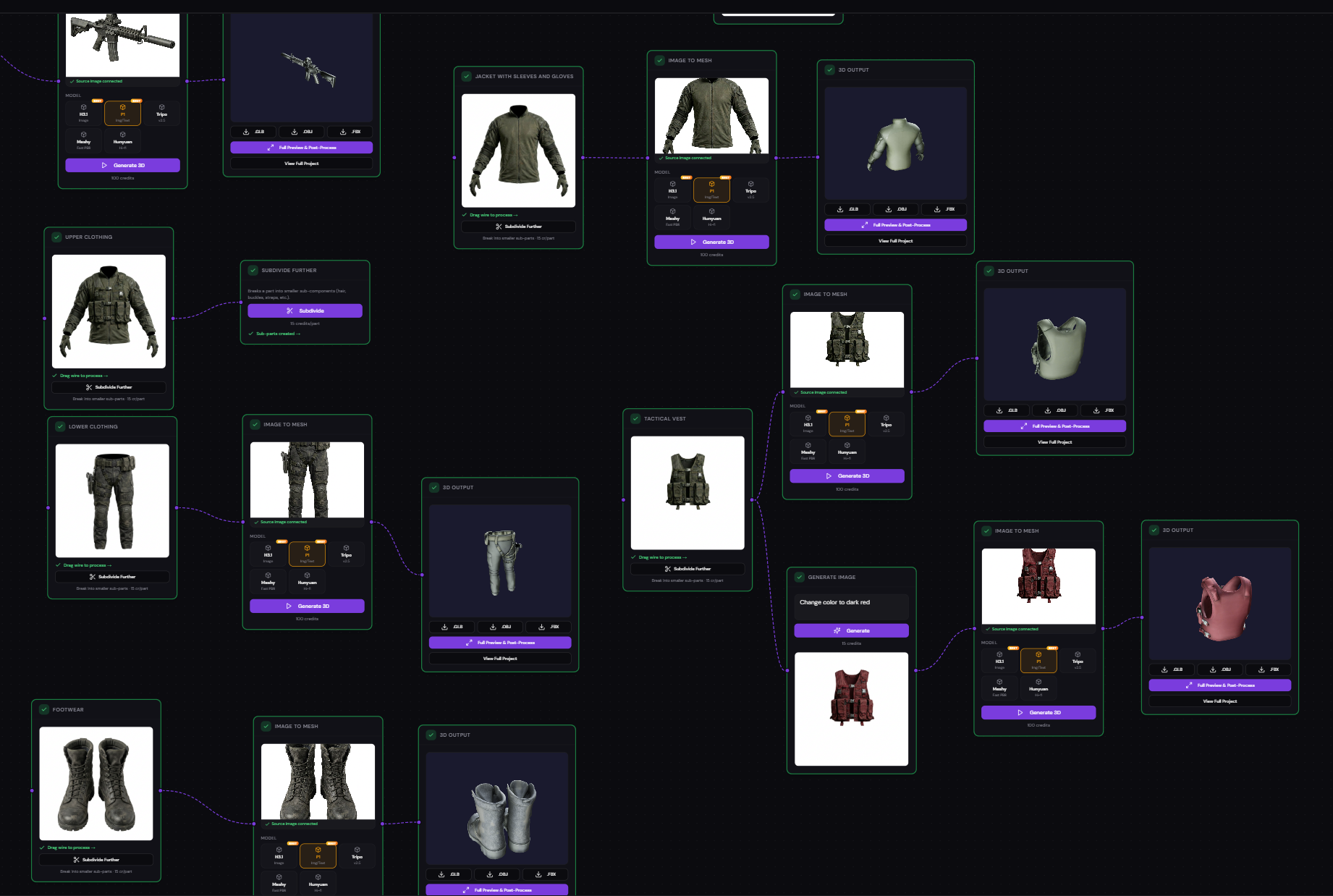
Why Game Developers Choose Carve 3D
AI 3D asset generation designed for game development workflows. From concept to game-ready mesh in minutes, not days.
Game-Ready Topology
AI retopology produces clean edge flow and optimized polygon counts that work in Unity, Unreal Engine, and any game engine. No manual cleanup needed.
Modular Asset System
Use "Divide in Parts" to split characters into body, armor, weapons, and accessories. Build swappable equipment systems and modular character kits.
Universal Export Formats
Export directly to GLB for web games, FBX for Unreal Engine, or OBJ for maximum compatibility. Assets are production-ready out of the box.
Iterate in Minutes
Generate, preview, retopologize, and export a game asset in under 5 minutes. Traditional 3D modeling of the same asset would take hours or days.
Batch Asset Generation
Generate entire sets of props, characters, or environment pieces in one session. The visual pipeline lets you process multiple assets in parallel.
What You Can Generate
From simple props to complex characters — Carve 3D handles every type of 3D game asset.
Props & Items
Weapons, potions, treasure chests, keys, food items, furniture, tools
Characters & NPCs
Heroes, villains, townspeople, creatures, monsters, bosses
Environment Pieces
Trees, rocks, buildings, ruins, vehicles, barriers, crates
UI & Collectibles
3D icons, power-ups, badges, currency, achievement trophies
From Idea to Game Asset in 4 Steps
Describe or Upload
Type a text prompt like "medieval iron sword with leather grip" or upload a concept image. Carve 3D generates reference images you can iterate on.
Generate 3D Mesh
Convert your reference image to a full 3D mesh using Tripo, Hunyuan3D, or Meshy. For complex objects, use multiview synthesis first for better accuracy.
Optimize for Games
Run AI retopology to clean up the mesh for game engines. Use remesh for uniform polygon distribution or retexture for custom materials.
Export & Use
Download as GLB (web/mobile games), FBX (Unreal Engine), or OBJ (Unity/Blender). Drop directly into your project — no conversion needed.
Stop Waiting for 3D Artists
Generate game-ready 3D assets yourself. Free account, 300 credits included, no credit card required.
Create Free Account